How to Set a Reorder Point That Holds
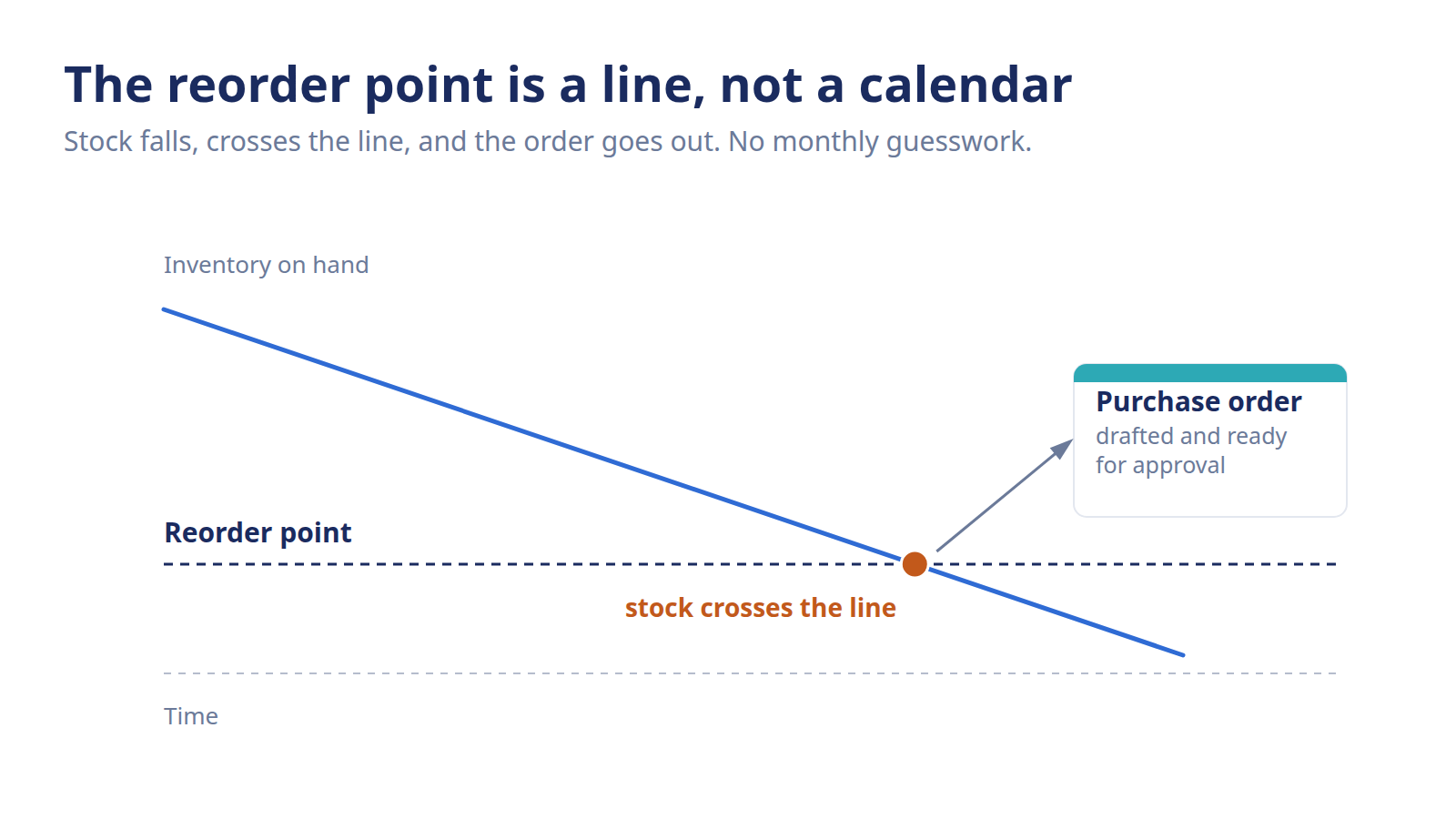
A reorder point is the stock level that triggers your next order. Learn what it is, the two ingredients behind it, and why a static reorder point goes stale.
On-hand reads 540 on Monday morning. Comfortable cushion, or quiet emergency? Without a trigger level, you're squinting at that number and guessing. And every reorder made on a guess is a reorder made under pressure. A reorder point takes the squinting out of it. It's the line in the sand that tells you, plainly, the exact moment to place the next order.
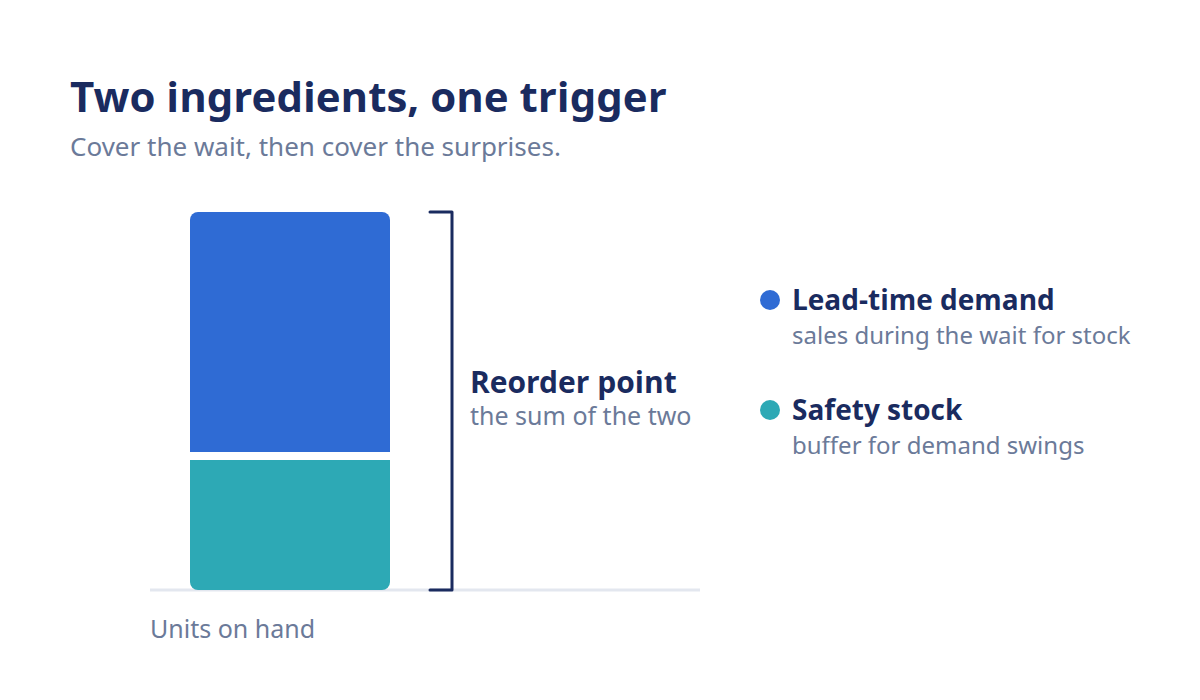
A reorder point is the inventory level that signals it's time to place your next order, so new stock lands before you run out. It answers *when* to order, not *how much*. It's built from two ingredients: the demand you'll burn through during the supplier's lead time, plus a safety stock buffer for the swings you can't predict.
What is a reorder point?
A reorder point is the stock level that fires a purchase order. When on-hand inventory drifts down and hits that number, it's your signal to reorder, timed so replenishment arrives before the shelf hits zero. Set it right and reordering stops being a Monday-morning judgment call. It becomes a rule your inventory follows on its own.
Think of it as a low-fuel light for each SKU. The light doesn't tell you how much gas to buy or which station to pull into. It tells you one thing: act now, or you'll get stranded. The reorder point does exactly that job for your stock.
It answers "when," not "how much"
Here's the distinction that trips a lot of operators up. The reorder point tells you *when* to place an order. It says nothing about *how much* to order once you do. That's a separate decision, driven by order quantity logic like economic order quantity. Blur the two and your reorder rules quietly start misfiring. If you want the "how much" side, our guide to economic order quantity covers order sizing in full.
So keep the two jobs clean in your head. One question is *when do I reorder?* The other is *how big is that order?* The reorder point owns the first and hands off the second.
The two ingredients behind it
Every reorder point is built from two things, and it helps to name them before you set one. The first is lead-time demand, the stock you'll sell between placing the order and receiving it. The second is safety stock, a buffer for the days demand runs hot or the supplier runs late.
Lead-time demand: how much you'll move while you wait for the next shipment to land.
Safety stock: the cushion that keeps you covered when either demand or lead time misbehaves.
Stack those two together and you've got a trigger that covers the expected sales *and* the surprises. Miss either ingredient and the trigger fires too early or too late.
How do you set a reorder point?
You set a reorder point in three moves. Estimate the demand you'll burn through during lead time, add a safety stock buffer for the swings, then load that number as the trigger in your system. The logic is the same for every SKU. The inputs are what change from one product to the next.
Start with lead-time demand. That's a read on how fast the product sells against how long replenishment actually takes. Not the supplier's quoted number, the real door-to-shelf window: shipping, customs, receiving. Lead time is worth understanding on its own, because it moves the trigger more than almost anything else. Our guide to lead time in inventory digs into where planners consistently underestimate it.
Then add the safety stock buffer. This is the deliberate cushion that absorbs a demand spike or a slow supplier while your order is in transit. Sizing it is its own calculation, one we won't run here. For the concept, start with what safety stock is. For the actual math and a full worked example, the reorder point formula walks it end to end, including how the two ingredients combine into a single trigger. This page frames the *what* and the *why*. Those pages own the *how much*.
One thing worth saying plainly: the safety stock and lead-time-demand values you feed in are only as good as the sales history behind them. Garbage in, garbage out. Pull average daily demand from a stretch that includes a one-off promo spike and you'll overstate the burn rate and over-order every cycle.
Why does a static reorder point go stale?
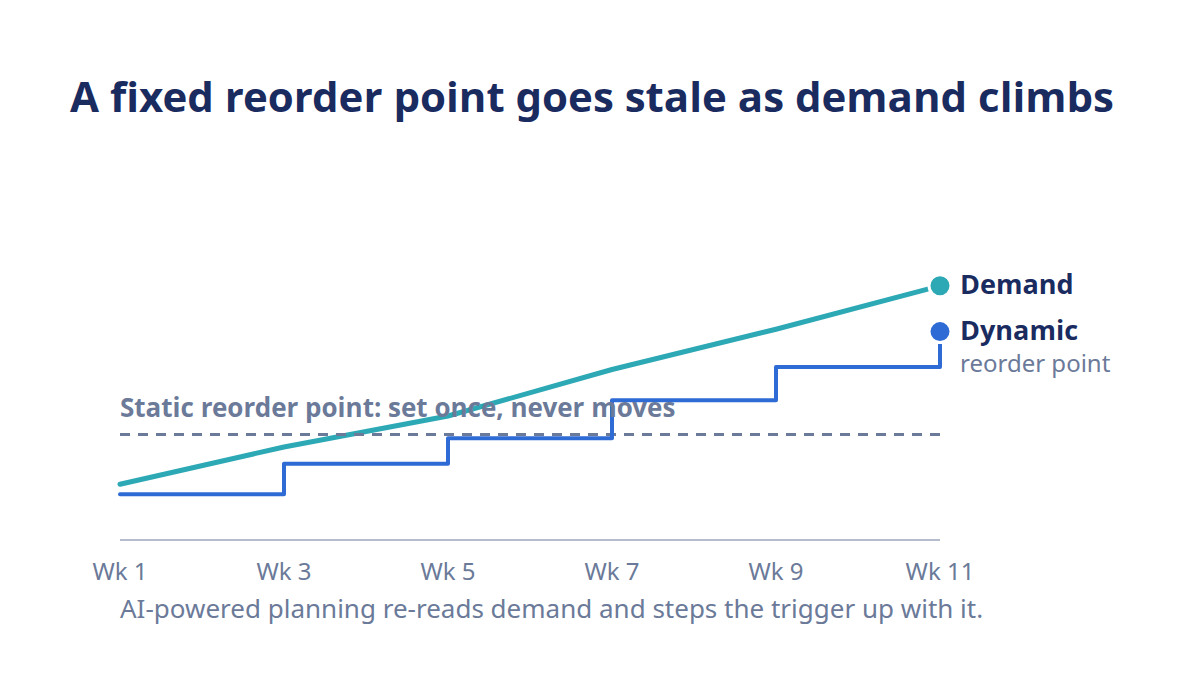
A reorder point goes stale because the two things it depends on don't hold still. Demand drifts as seasons turn and products age. Lead times stretch when a supplier gets busy or a lane clogs up. Set the trigger once and it drifts out of sync, firing too early and tying up cash, or too late and leaving you short.
That's the trap with a number you set and forget. It felt right the day you entered it. Six weeks later, say demand has climbed 20%, and the same trigger now fires days too late. Nobody touched it, yet it's wrong. A reorder point isn't a one-time setting. It's a living number that has to move as its inputs move.
When to refresh it
The honest answer: whenever demand or lead time shifts enough to matter, and at minimum every planning cycle. A supplier who quietly stretches from nine days to twelve just changed your right trigger, whether or not you noticed. So did the SKU that started selling faster after a good review. Both of those move the number, and neither sends you a memo.
For a handful of SKUs, you can keep up by hand. For hundreds, each with its own demand rate and lead time drifting on its own schedule, the manual approach breaks down fast. That's usually the point where reorder points start firing late across the catalog and nobody can say exactly which ones.
Where dynamic, AI-powered reorder points help
This is where AI-powered demand forecasting earns its place. Instead of a static trigger you revisit once a quarter, the reorder point recalculates as the model senses demand and lead time shifting. So the trigger stays current without anyone rebuilding spreadsheets. The practical payoff is time: your team stops babysitting formulas and gets hours back each week for the buying decisions that actually need judgment.
Conative's inventory planning platform (/solutions/inventory) calculates reorder points and safety stock by SKU. It flags when a product nears its trigger, so replenishment runs on a current number, not last quarter's. The goal isn't to take the decision away from your planners. It's to hand them a trigger they can trust.
Frequently asked questions
Does the reorder point tell me how much to order?
No. The reorder point answers *when* to order, the stock level that fires the trigger. It doesn't set the order size. How much to order is a separate decision, driven by order quantity logic like economic order quantity. The two work together: the reorder point fires the signal, and the order quantity sizes the resulting purchase.
What's the difference between reorder point and reorder quantity?
The reorder point is *when* you order, the stock level that triggers a new purchase. The reorder quantity is *how much* you order once that trigger fires. One is a threshold you watch; the other is the size of the order. They pair up to run a reorder: the point starts it, the quantity sizes it.
How often should I update reorder points?
Update a reorder point whenever average daily demand or lead time shifts meaningfully, and at minimum each planning cycle. Both inputs drift as sales history updates and suppliers change delivery times, so a trigger set months ago may now fire too early or too late. AI-powered tools recalculate continuously to keep the trigger current across a large catalog.
Does every SKU need its own reorder point?
Yes, if you want reliable triggers. Each SKU has its own sales rate, lead time, and safety stock, so a single shared number will be wrong for most of them. Fast movers hit their trigger far sooner than slow ones. Setting reorder points per SKU is exactly why the manual approach strains at scale across a catalog.
What happens if my reorder point is too low?
If the reorder point is set too low, the trigger fires too late and stock can run out before replenishment arrives, causing a stockout. This usually traces back to an understated lead time or too little safety stock. Setting it too high carries the opposite cost: you order early, hold excess inventory, and tie up cash you could deploy elsewhere.
Can reorder points adjust automatically?
Yes. AI-powered demand forecasting recalculates reorder points as demand and lead time shift, so the trigger updates on its own instead of sitting frozen at a number you set last quarter. The benefit is practical: your team spends less time rebuilding triggers by hand and more time on the buying calls that need real judgment.